
Employee Calendar
The Calendar page provides an employee with an overview of their calendar events and annual leave details, if applicable.
1) To access your full calendar, select 'View Full Calendar' on the Dashboard screen. Alternatively, click 'Calendar' on the top menu bar.
This will provide an overview of the your calendar events as follows:
2) Use the 'arrow' navigation buttons at the top right of the calendar to move forwards and backwards in the year. Hover your mouse over a day on the calendar to see details.
Note: It is not possible to show on the calendar half day (or part day) sick leave or part working days. The calendar for working days and other leave types (apart from annual leave) are in full days.
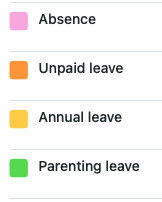
To remove / delete a calendar entry, simply highlight the date(s) on the calendar for the employee and then click on the type of leave you would like to remove on the right hand side of the screen.
To view absences (leave, sick, etc.) in calendar format, use the Employee Calendar feature. This shows all employee absence records visually, and can be filtered by type or date.
The holiday calendar in BrightPay Cloud can only display and track holidays and other leave types for employees. It is not possible to add or view holiday entries for non-employees; only employees will appear on the calendar.
It is not possible to stop an employee overbooking annual leave and there is no warning or flag for the user to indicate that this would happen. It would be up to the manager / client who is approving the leave to check that the employee has enough leave to cover the annual leave request before approval.
It is not possible to track employee's leave on BrightPay unless you use the calendar. There is no other feature to record leave types other than the calendar.
Please note: There is no activity log / audit trail to show which user has entered or removed leave types on the employee calendar.
Comments
0 comments
Article is closed for comments.