
Apart from the following:
- Ordinary Superannuation Contributions
- Additional Voluntary Contributions
- Revenue Approved Permanent Health Deductions
- Personal Retirement Savings Accounts (PRSA)
- Retirement Annuity Contracts (RAC)
- Salary sacrificed for a travel pass scheme or Cycle to Work Scheme
An employee may claim a tax credit from Revenue for expenses that are wholly, exclusively and necessarily incurred in the performance of the duties of the employment. If due, it will form part of their tax credits and standard rate cut off point and will not reduce the employee's taxable pay as already calculated.
Tax Credit
Standard Rate Cut Off Point (SRCOP)
Tax Exemption and Marginal Relief
Basis to apply PAYE
PAYE can be deducted on any of the following calculation methods:
- Cumulative
- Week One/Month One
- Emergency
Cumulative
Week One/Month One
Emergency
- An employee has not provided their Personal Public Service Number (PPSN)
- Employee is not registered for Pay As You Earn (PAYE)
Employees will automatically be registered for PAYE when they register a job or pension using the 'Jobs and Pensions' service.
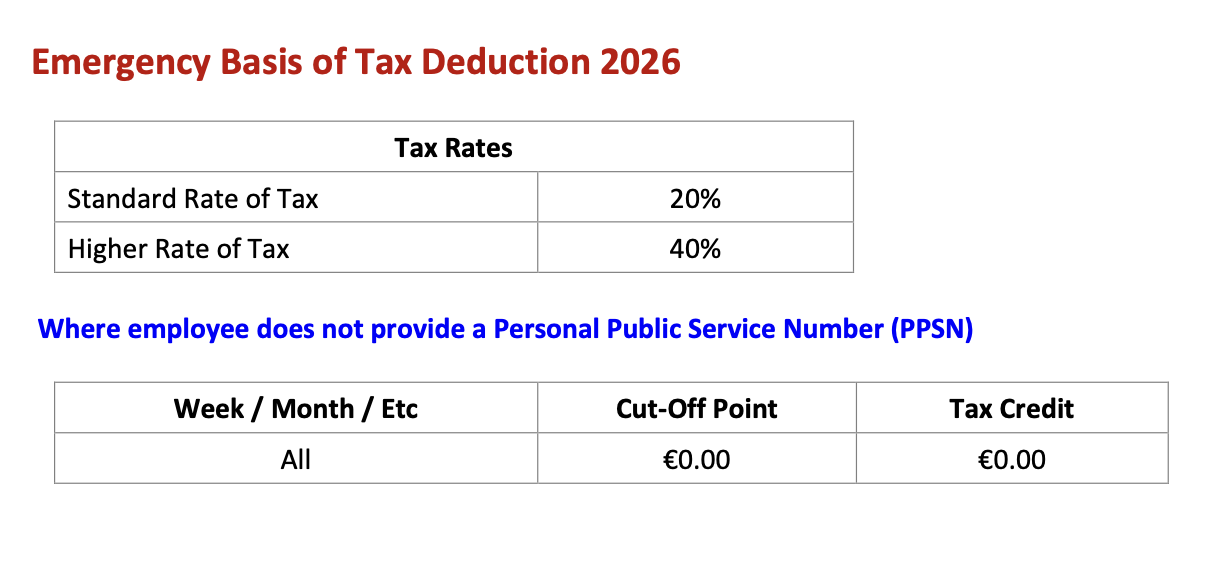
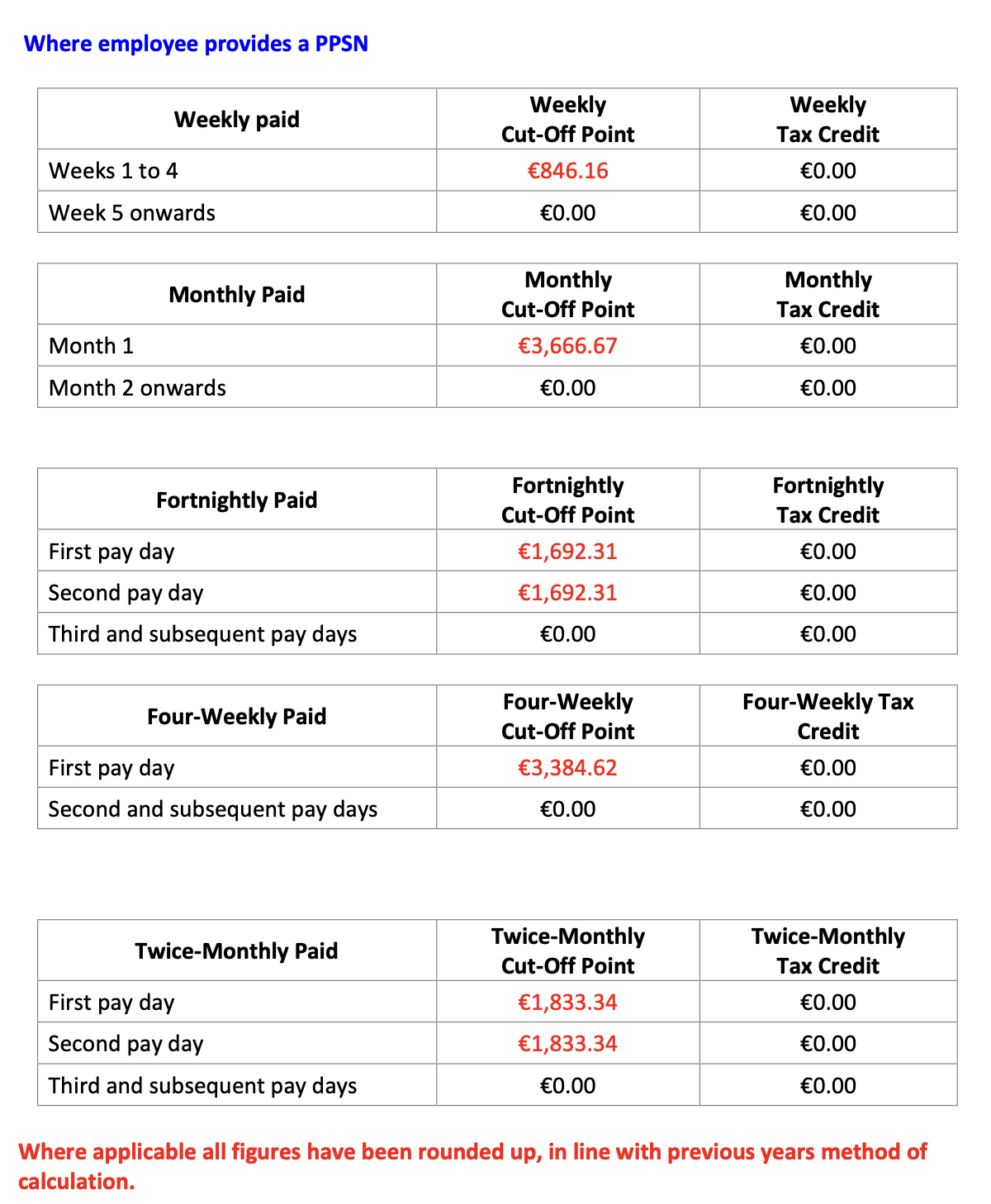
Emergency Basis of Tax Deduction 2026
Calculating PAYE
The basic simplified steps to calculating the PAYE deduction are:
- Gross Pay - Calculate the Gross Pay subject to PAYE
- Gross Tax - Any pay less than or equal to the SRCOP, calculate at 20%
- If the taxable Gross pay exceeds the SRCOP - calculate the balance of pay at 40%
- Tax Credit - Reduce the Gross tax by the tax credit, reducing the tax payable
- Balance - The remaining balance is the PAYE tax payable
FAQs Tax (PAYE)
Q. When an employee receives a tax refund, does the employer pay this back, or does Revenue handle it? How does this work?
A. When a tax refund occurs, it reduces the PAYE liability for that period. Essentially, the refund comes off the amount the employer owes to Revenue, so the employer is not paying the refund directly. Instead, it reduces the amount due to Revenue for that tax month.
Q. An employee has paid too little tax in a pay period. Can it be paid back monthly through their salary?
A. Sometimes, yes – but only in specific circumstances.
If, in a particular pay period, the total Tax/USC/PRSI due is more than the net pay (for example because of a large once‑off Benefit in Kind (BIK)), the employer must still pay the full amount due to Revenue for that period. In this case, the employer may agree a repayment plan with the employee to recover the underpaid amount from future wages over several pay periods.
In all situations other than the “insufficient net pay” scenario, tax is deducted in line with the employee’s tax credits and cut‑off points. If an underpayment or overpayment of tax has occurred, Revenue will usually issue a new tax credit certificate with adjusted credits and cut‑off points. Once this updated certificate is applied, Payroll will calculate tax accordingly in the next pay period.
If, however, an employee would end up with negative net pay, it may be advisable to contact Revenue to request an amended certificate, where appropriate.
Q. An employee's payslip was re-opened and the tax amount has changed. How do I manually override it to revert it back to the original amount?
A. The amount of tax due is automatically calculated by BrightPay based on the periodic salary details and the YTD information. There is no way to manually override the tax calculations or edit this on the payslip. The tax amount due can change after re-opening a payslip for a number of reasons including;
- The payment amount was changed.
- Benefit(s) have been added to the employee's record for that pay period (or a date which falls in an already closed pay period so there is now more tax due YTD).
- No RPN was retrieved prior to finalising the payslip and now a new RPN has been received with the employee's correct tax credits and cut offs.
- There was a RPN retrieved previously, but the RPN was re-run after re-opening the payslip and new credits and cut offs have been applied by Revenue (ie the new RPN now includes previous employment figures for the employee).
Comments
0 comments
Article is closed for comments.