
USC operates in the same manner as PAYE, varying by employee:
- USC rates and cut off points (COPs) are issued per employee
- Employers are advised of these rates and COPs along with the calculation basis on the Revenue Payroll Notification (RPN)
- Employers should not alter treatment from the RPN instruction
- Employers should check for RPNs before processing each pay period
- Employers should not change how an employee is treated for USC based on personal circumstances (medical card/over70)
Revenue Payroll Notification (RPN)
The Revenue Payroll Notification (RPN) is used to retrieve tax credits and cut off points and also USC rates and cut off points for new and existing employees.
It is NOT the responsibility of the employer to determine amendments to the operation of USC based on an employee’s personal circumstances.
Individuals aged 70 and over whose aggregate income is less than €60,000 and Individuals who hold full medical cards whose aggregate income is less than €60,000
Where lower rates of USC apply in certain circumstances, for example, in the case of employees aged 70 and over whose aggregate income is less than €60,000, or where employees hold full medical cards whose aggregate income is less that €60,000, these lower rates will be stated on the RPN issued by Revenue.
Where lower rates are not stated on the RPN file currently held, the employee should be advised to contact their local Revenue office in order to update their USC status with Revenue.
USC Exemption
USC Emergency Basis
No cut off points are allowed. The emergency rate of USC is the highest rate applicable to a PAYE employee, currently 8% for 2026. While the rules applicable to emergency tax operable in PAYE include a standard rate cut off point for the first four weeks (provided the employer has the PPS Number for the employee), for USC there is just a flat % rate (with no cut off point) applied to all payments.
Please note: all employees will be on the emergency basis until an RPN Is received for them.
Employees Commencing Employment
RPNs will be available in real time for new employees, this removes the need for the emergency basis in most cases.
USC Exemption Marker
Calculating USC on Week 53
Where a week 53 occurs, an additional period of USC threshold is allocated to the employee on a week 1 basis.
In this instance, you will need to instruct the software if the additional USC cut off points are not applicable to an employee.
To prevent the additional USC cut off points being allocated, go to:
Employees > Select the employee > Click their Revenue Details tab > Tick to exclude the employee from the week 53/54/56 USC concession > Save the change.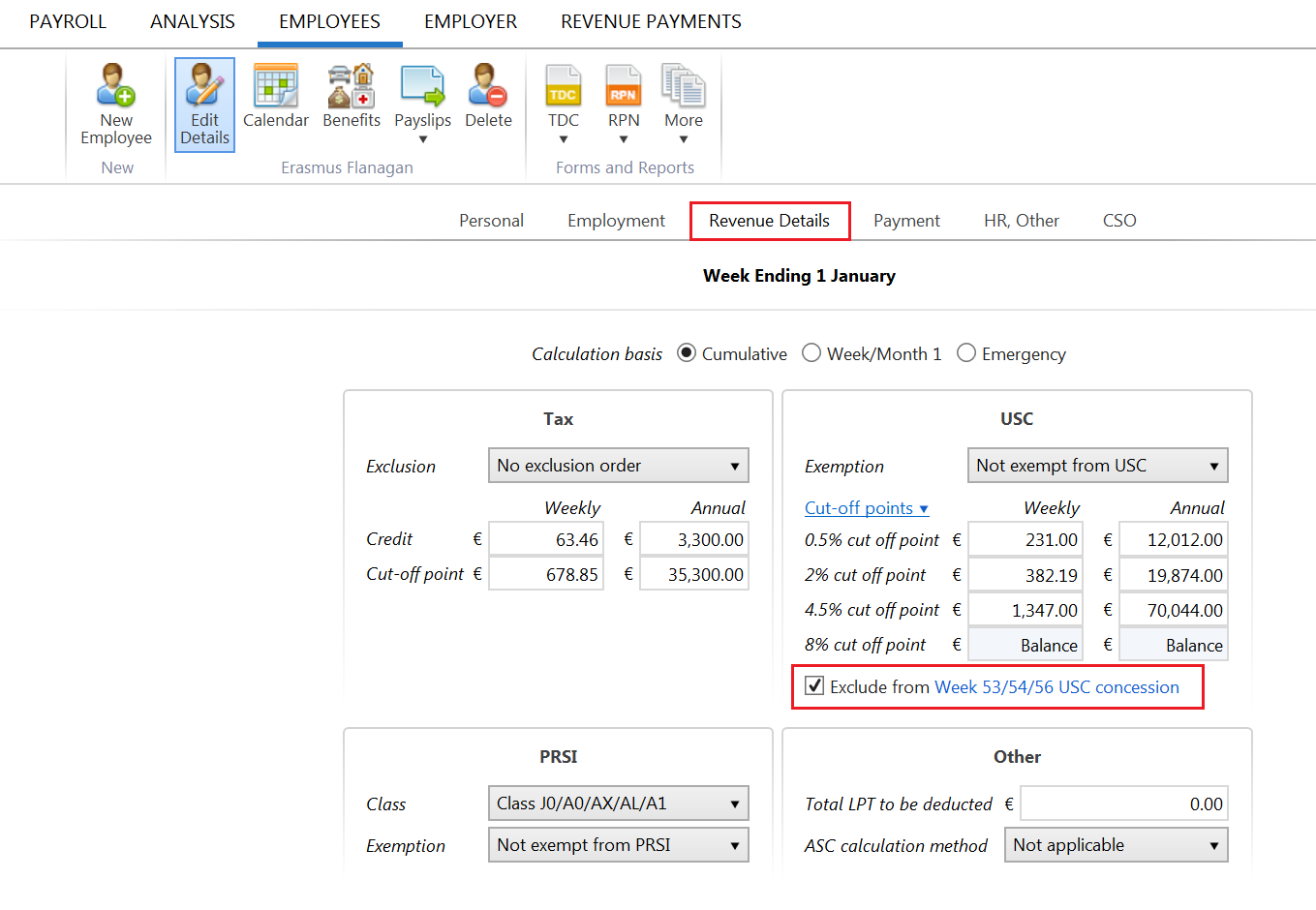
Comments
0 comments
Article is closed for comments.