
Within the Employees section please click on an employee to navigate to their employee dashboard.
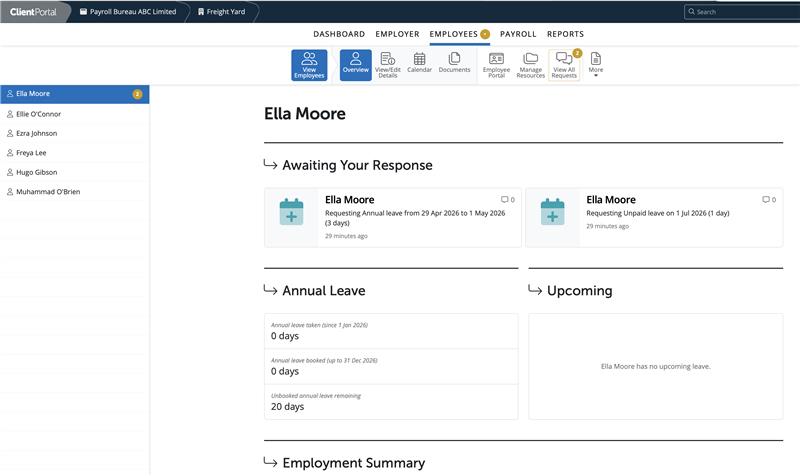
Your view of an employee's dashboard views any outstanding employee leave or change of personal details requests, their annual leave entitlement and any upcoming leave for the employee.
A user can view an employee's personal, employment and HR details, view the employee calendar and enter in leave, view payroll documents such as payslips.
Employee Portal Settings can be accessed, Resources can be added or managed and all employee requests can be viewed by a user.
If an employee has been marked as confidential within the HR section of the Employee record in the Payroll then this will hide this employee from users/managers who don’t have the requisite permission
To view, print, email or download an employee's payslip, select the employee then 'Documents'.
Select the pay period you wish to view. The employee's payslip will then appear on screen. The options to print, email or download will appear in the top right of the screen.
Employees are listed by first name, there is no option to change the ordering in the Client portal, ie to order by surname, works number.
Note: Currently, you can only view payslips in the Client Portal for one employee and one pay period at a time in the 'Employees' section. To view a full pay period for all employees, use the 'Pay periods' section.
You cannot see employees who left in a previous tax year in the Employee list in the Client Portal, as leavers are not carried forward into the new tax year. However, you can still view their historical pay by going to Pay Periods and scrolling back to the relevant periods in the previous tax year. All payroll data, including for leavers, remains available in the Client Portal.
Client users will see current employees and leavers who left in the current tax year in the Employees list until the end of the tax year. When the new tax year starts, leavers from previous years will no longer be visible in the Employees section and will be removed from the list.
Note: It is not possible to enter ERR expenses and benefits from within the client portal.
Comments
0 comments
Article is closed for comments.