
The National Automatic Enrolment Retirement Savings Authority (NAERSA) assesses employees for auto enrolment based on payroll information reported to Revenue.
Find the step by step guide for how to process Auto Enrolment in BrightPay here.
In order to instruct an employer in BrightPay to enrol an employee into My Future Fund an Automatic Enrolment Payroll Notification (AEPN) must be sent by NAERSA.
Within BrightPay, the first step for processing payroll is to retrieve your RPNs with the tax credits and cut off points for employees. This can be actioned under > Update Employees in the Payroll section.
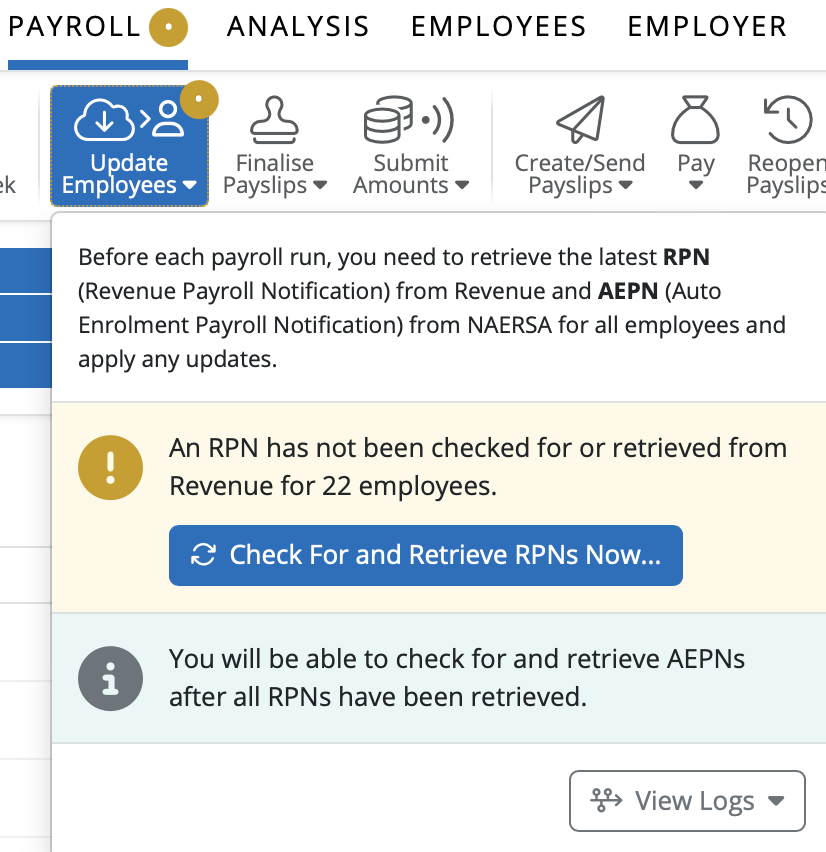
BrightPay has simply added a second update option to retrieve the AEPN from NAERSA. Once the RPN has been retrieved and updated, the option to ‘Check For and Retrieve AEPNS Now’ will be available.
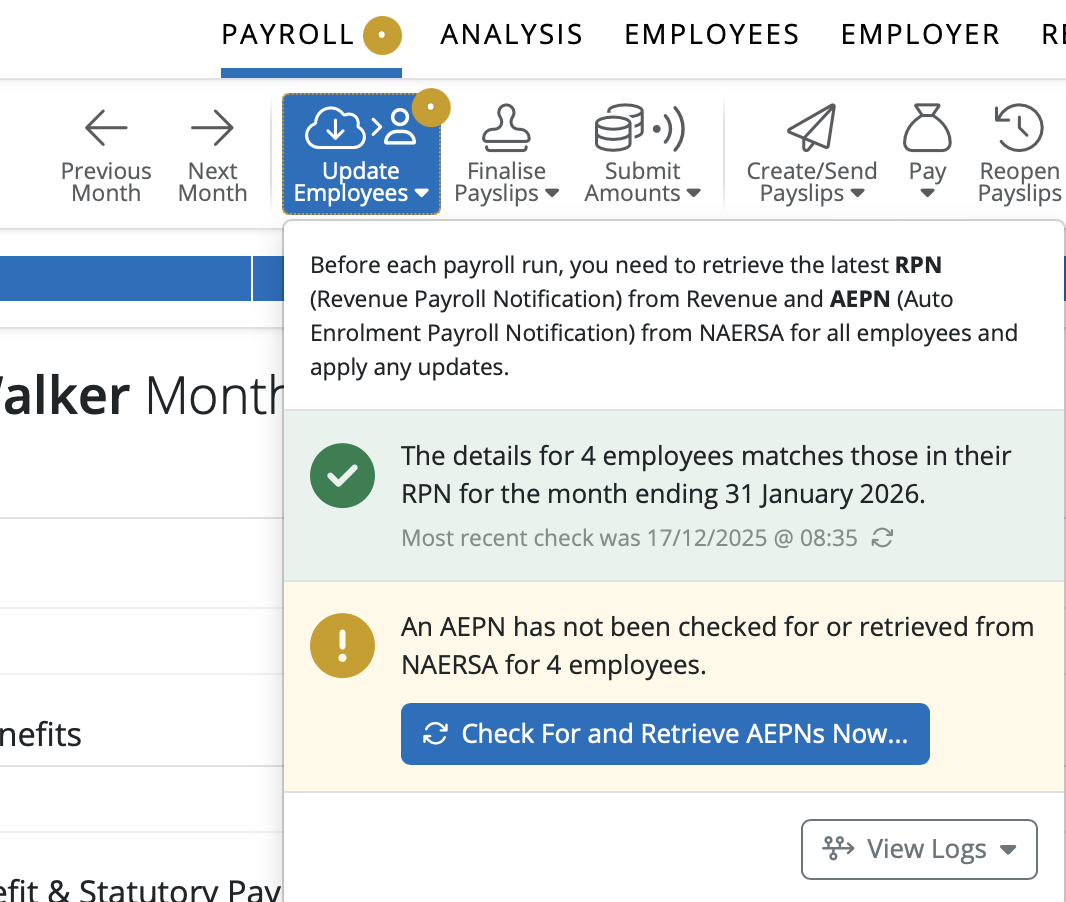
The response will come back from NAERSA if any employees need to be enrolled in My Future Fund with the percentage rate information and enrolment status and date.
To update the employees from the AEPN please select ‘Apply Selected Updates’. Employees auto enrolment status will be updated.

Select an employee in the Payroll section. Under the Additions and Deductions heading you will see My Future Funddetails including the Employer and Employee Contribution rates.
On the right of the screen under ‘This Period’ tab you will see the amounts for the Employer and Employee Contribution for My Future Fund. The Employee’s Contribution amount is deducted from Net Pay.
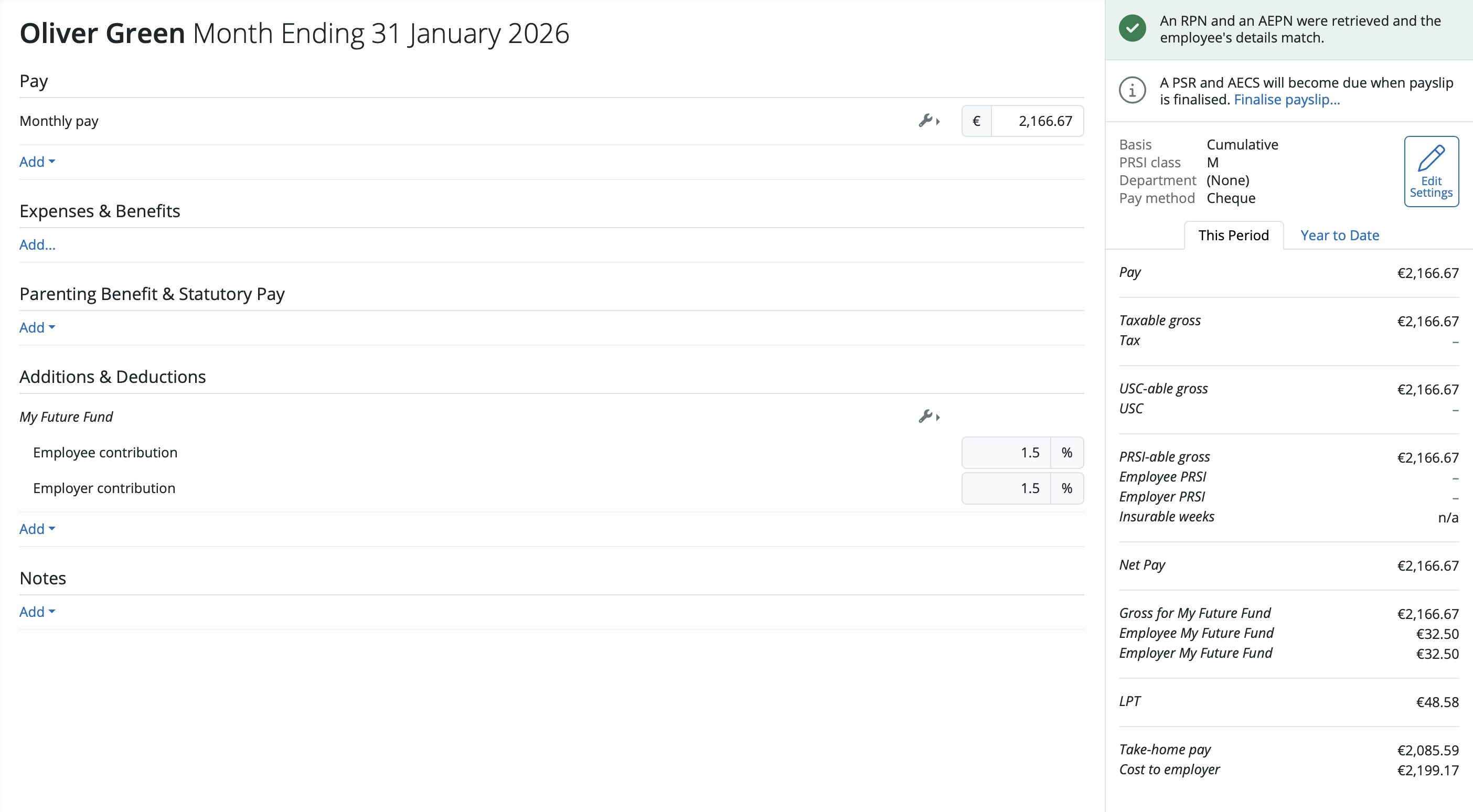
The status has been updated on the right hand side of the screen for the employee that an RPN and AEPN were retrieved and the employee’s details match.

If you are receiving an error 'MFFINTERR0042 Handshake unsuccessful' when trying to retrieve the AEPN, you can try to renew your digital cert.
Firstly, save a copy of your cert from ROS on your pc - https://payrollsupport.ie.brightsg.com/hc/en-gb/articles/37172537975697-Saving-a-ROS-Digital-Certificate-on-to-your-computer
Once saved can you please go to Settings (top right corner), then under Submissions, click on ROS Certificate and remove your current certificate by selecting the spanner icon.
Next, click Add Certificate, search your folders, and upload your most recent certificate. Please ensure this is set as your default
Once completed, could you please try requesting the AEPN again.
Once the pension contributions have been submitted to NAERSA, it can take up to 10 working days to show on your MyFutureFund account. If the submission is showing as successful on BrightPay, but after this 10 day period it is not showing on MFF, please contact NAERSA directly.
Q. Why isn't a new employee automatically registered for AEPN (Automatic Enrolment) when they were already enrolled with a previous employer?
A. The following can cause a new employee not to appear on the AEPN (Automatic Enrolment Payroll Notification) for MyFutureFund (Irish auto-enrolment pension) and what to check:
1. NAERSA Eligibility & AEPN Issuance
Employees only appear on the AEPN after NAERSA (National Automatic Enrolment Retirement Savings Authority) has:
- assessed them as eligible based on age, earnings and pension status, and
- issued the AEPN notification to your payroll system.
If NAERSA hasn’t yet determined eligibility or issued the AEPN, the employee won’t show up in the payroll AEPN list yet.
2. Timing of AEPN Updates
AEPNs aren’t real-time – NAERSA issues them weekly (typically on Mondays covering changes up to the prior Thursday). If the employee was added after the last AEPN run, they simply won’t be included until the next AEPN update.
3. Payroll System Sync / Import
Even if NAERSA has issued an AEPN, your payroll software must retrieve and import the latest AEPN file:
- Make sure you’ve pulled the latest AEPNs from NAERSA into your payroll system.
- Only those on the retrieved AEPN will show as enrolled/deemed eligible.
If you haven’t done this or if there’s an import error, the employee won’t appear.
4. Employee Details Matching
NAERSA matches AEPNs to employees using identifiers such as PPS Number and Employment ID. If these aren’t correct or don’t exactly match:
- The system won’t link the AEPN to the employee record,
- So the AEPN won’t show for that person in payroll.
Check that the PPS number and the payroll employment ID are entered correctly.
5. Re-employment / Employment ID Changes
If the employee was re-employed recently or the Employment ID changed, AEPNs previously linked can drop off. It may be required to remove the MyFutureFund setup when a re-employment or ID change occurs — and you then need to re-import the AEPN.
What to Do Next:
Confirm NAERSA has issued an AEPN for that employee
Check the MyFutureFund/NAERSA portal to see if the employee appears in the enrolled list or AEPN list.
Retrieve the latest AEPN in BrightPay
Even if the AEPN exists, payroll needs the latest file. Import it and review any import errors.
Check employee identifiers
Make sure the PPS number and Employment ID in payroll match what NAERSA expects.
Allow time for processing
AEPN updates are weekly, so a newly added employee might not appear until after the next AEPN run.
Contact NAERSA/MyFutureFund support if needed
If all else checks out and the AEPN still doesn’t show, contact NAERSA directly — they can force an AEPN re-issue if necessary.
Comments
0 comments
Article is closed for comments.